Bugbot can automatically fix issues it finds in pull requests.
Autofix runs cloud agents on their own machines to test changes and propose fixes directly on your PR. Today, over 35% of Bugbot Autofix changes are merged into the base PR.
Bugbot will post a comment on the original PR with a preview of the autofix changes, which you can merge using the provided @cursor command. If you'd like, you can instead configure autofix to push changes directly to your branch with no interaction required.
Cloud agents can now use the software they create to test changes and demo their work.
After onboarding onto your codebase, each agent runs in its own isolated VM with a full development environment. Cloud agents produce merge-ready PRs with artifacts (videos, screenshots, and logs) that make it possible to quickly review their changes.
Cloud agents are available anywhere you use Cursor, including web, desktop, mobile, Slack, and GitHub.
Get started at cursor.com/onboard to watch the agent configure itself and record a demo. Or read more in our announcement.
This release introduces the ability to hand off plans from the CLI to the cloud, in-line rendering of ASCII diagrams, and many quality-of-life improvements.
When a plan is generated, the CLI now shows a persistent decision menu. You can choose to build in the cloud or build locally to execute the plan.
Typing /plan takes you back to your current plan and its action menu. We've also added keyboard shortcuts in the prompt bar so you can use arrow keys to navigate options, Enter to execute the selected option, and Shift+Enter as a shortcut for "Build in cloud."
Mermaid code blocks now render inline as ASCII diagrams in your CLI conversation. Flowcharts, sequence diagrams, state machines, class diagrams, and ER diagrams can all be displayed directly in the terminal.
Ctrl+O allows you to switch between the rendered diagram and the original mermaid source to see both representations.
We've also made lots of improvements to the CLI focused on tooling, quality of life, and reliability.
AI code and conversations in CLI are now tracked by Cursor Blame.
AI code attribution is now preserved by Cursor Blame when formatters like Prettier, Biome, or pre-commit hooks rewrite code.
File deletions are tracked by Cursor Blame to reflect the full lifecycle of code.
Clipboard operations on Linux now work with Wayland (wl-copy) and X11 (xclip) for better compatibility across desktop environments.
Agent sessions are now saved as JSONL transcripts. Headless mode also writes transcripts, making it easier to review and debug non-interactive runs.
CLI now stores conversation transcripts that the agent can use as context.
Unified domain allowlisting for WebSearch and WebFetch.
Known-safe URLs (e.g. Cursor docs) are auto-approved without permission prompts.
When an MCP server's credentials expire mid-session, the agent can now re-authenticate on demand instead of failing silently.
If you skip approving an MCP server, it stays disabled for the rest of the session rather than prompting you repeatedly.
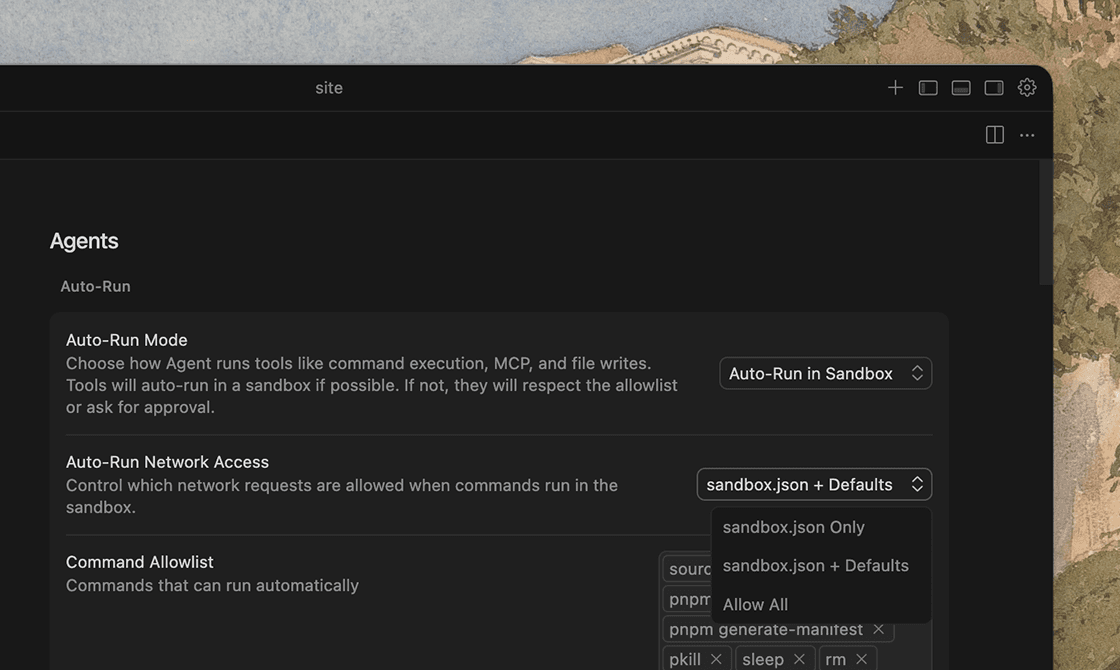
The sandbox in the CLI now supports granular network access controls: user config only, user config with defaults, or allow all.
/resume now sorts by last interaction time, not creation time, so your most recent conversations appear first.
Model reasoning and thinking blocks are now rendered inline as they stream in.
Markdown tables now wrap text within cells, use box-drawing borders, and correctly handle escaped pipes.
Your message appears right after sending, and the "Generating..." indicator clears as soon as the model finishes rather than waiting for the full stream to close.
/auto-run, /max-mode, /vim, and similar commands now toggle with a single invocation. Current status is shown in the command description.
Slash commands are ranked by how closely they match what you've typed, with recency as a tie-breaker.
Added Emacs-style navigation: Ctrl+N/Ctrl+P for up/down and Ctrl+G for cancel/dismiss, alongside the existing arrow keys and Esc.
This release introduces plugins for extending Cursor, improvements to core agent capabilities like subagents, and fine-grained network controls for sandboxed commands.
Plugins package skills, subagents, MCP servers, hooks, and rules, into a single install. The Cursor Marketplace lets you discover and install plugins to extend Cursor with pre-built capabilities.
Our initial partners include Amplitude, AWS, Figma, Linear, Stripe, and more. These plugins cover workflows across design, databases, payments, analytics, and deployment.
Browse plugins at cursor.com/marketplace or install directly in the editor with /add-plugin.
The sandbox now supports granular network access controls, as well as controls for access to directories and files on your local filesystem. Define exactly which domains the agent is allowed to reach while running sandboxed commands:
User config only: restricted to domains in your sandbox.json
User config with defaults: restricted to your allowlist plus Cursor's built-in defaults
Allow all: unrestricted network access within the sandbox
Admins on the Enterprise plan can enforce network allowlists and denylists from the admin dashboard, ensuring organization-wide egress policies apply to all agent sandbox sessions.
Previously, all subagents ran synchronously, blocking the parent agent until they complete. Subagents can now run asynchronously, allowing the parent to continue working while subagents run in the background.
Subagents can also spawn their own subagents, creating a tree of coordinated work. This allows Cursor to take on bigger tasks like multi-file features, large refactors, and challenging bugs.
We've also made some performance improvements to subagents since our last release. They now run with lower latency, better streaming feedback, and more responsive parallel execution.
Agents can now search past conversations and use chat history as context.
The Cursor CLI agent can handle the sudo password prompt inline for commands that require elevated privileges.
Common operations like git clone, npm install, and pip install now work out of the box in the agent sandbox. You can extend or override these defaults per-project.
When the agent is in Plan mode, you can now choose "Build in Cloud" to hand off plan execution to a Cloud Agent while you continue working locally or close your laptop.
Toggle inline diffs on or off in your settings. By default, diffs are shown only in the review panel.
Renamed "Duplicate Chat" to "Fork Chat" in the three-dot menu of a chat message.
Improved permission request flow for subagents.
Improved the performance of very long chats.
Improved the performance of @ mentions.
Added keyboard shortcut ⌘+Enter (Ctrl+Enter) to submit messages in agent conversations.
Removed the Dotfile Protection setting to remove unexpected approval prompts when the agent tried to edit dotfiles.
Removed Default Mode setting so each new agent conversation begins fresh.
Removed Auto-Accept on Commit setting so pending diffs are automatically accepted when you commit.
Cleaned up the More Actions chat menu.
Added a Close button to the agent chat pane.
Manual edits no longer create in-line diffs.
Fixed bug where some terminal tool calls caused degraded performance.
Fixed keybinding behavior for Cmd+Opt Left/Right for tab navigation.
Fixed an auto-run mode switching bug.
Fixed errors when creating project rules with no workspace open.
The global ignore list is now empty by default to fix sandboxing issues. Existing ignore patterns still work the same.
Stopping the parent agent will always stop the child subagents.
Enforce read-only sandbox for Ask mode even with "Run everything" enabled.
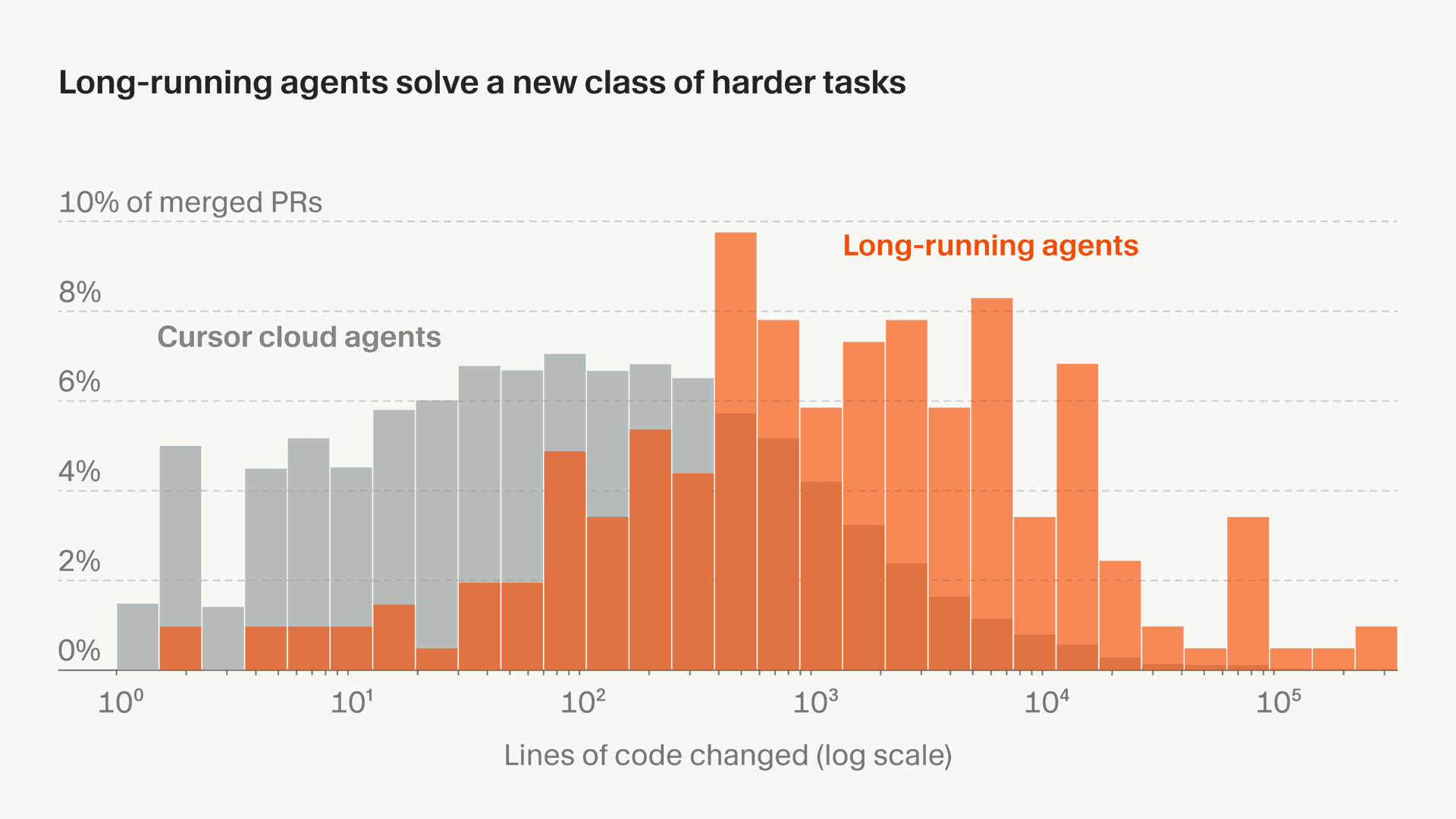
Cursor can now work autonomously over longer horizons to complete larger, more complex tasks. Long-running agents plan first and finish more difficult work without human intervention.
In research preview and internal testing, long-running agents completed work that was previously too hard for regular agents. This led to larger, more complete PRs with fewer obvious follow-ups.
Cursor's long-running agent is now available at cursor.com/agents for Ultra, Teams, and Enterprise plans.
Bugbot can automatically fix issues it finds in pull requests.
Autofix runs cloud agents on their own machines to test changes and propose fixes directly on your PR. Today, over 35% of Bugbot Autofix changes are merged into the base PR.
Bugbot will post a comment on the original PR with a preview of the autofix changes, which you can merge using the provided @cursor command. If you'd like, you can instead configure autofix to push changes directly to your branch with no interaction required.
Cloud agents can now use the software they create to test changes and demo their work.
After onboarding onto your codebase, each agent runs in its own isolated VM with a full development environment. Cloud agents produce merge-ready PRs with artifacts (videos, screenshots, and logs) that make it possible to quickly review their changes.
Cloud agents are available anywhere you use Cursor, including web, desktop, mobile, Slack, and GitHub.
Get started at cursor.com/onboard to watch the agent configure itself and record a demo. Or read more in our announcement.
This release introduces the ability to hand off plans from the CLI to the cloud, in-line rendering of ASCII diagrams, and many quality-of-life improvements.
When a plan is generated, the CLI now shows a persistent decision menu. You can choose to build in the cloud or build locally to execute the plan.
Typing /plan takes you back to your current plan and its action menu. We've also added keyboard shortcuts in the prompt bar so you can use arrow keys to navigate options, Enter to execute the selected option, and Shift+Enter as a shortcut for "Build in cloud."
Mermaid code blocks now render inline as ASCII diagrams in your CLI conversation. Flowcharts, sequence diagrams, state machines, class diagrams, and ER diagrams can all be displayed directly in the terminal.
Ctrl+O allows you to switch between the rendered diagram and the original mermaid source to see both representations.
We've also made lots of improvements to the CLI focused on tooling, quality of life, and reliability.
AI code and conversations in CLI are now tracked by Cursor Blame.
AI code attribution is now preserved by Cursor Blame when formatters like Prettier, Biome, or pre-commit hooks rewrite code.
File deletions are tracked by Cursor Blame to reflect the full lifecycle of code.
Clipboard operations on Linux now work with Wayland (wl-copy) and X11 (xclip) for better compatibility across desktop environments.
Agent sessions are now saved as JSONL transcripts. Headless mode also writes transcripts, making it easier to review and debug non-interactive runs.
CLI now stores conversation transcripts that the agent can use as context.
Unified domain allowlisting for WebSearch and WebFetch.
Known-safe URLs (e.g. Cursor docs) are auto-approved without permission prompts.
When an MCP server's credentials expire mid-session, the agent can now re-authenticate on demand instead of failing silently.
If you skip approving an MCP server, it stays disabled for the rest of the session rather than prompting you repeatedly.
The sandbox in the CLI now supports granular network access controls: user config only, user config with defaults, or allow all.
/resume now sorts by last interaction time, not creation time, so your most recent conversations appear first.
Model reasoning and thinking blocks are now rendered inline as they stream in.
Markdown tables now wrap text within cells, use box-drawing borders, and correctly handle escaped pipes.
Your message appears right after sending, and the "Generating..." indicator clears as soon as the model finishes rather than waiting for the full stream to close.
/auto-run, /max-mode, /vim, and similar commands now toggle with a single invocation. Current status is shown in the command description.
Slash commands are ranked by how closely they match what you've typed, with recency as a tie-breaker.
Added Emacs-style navigation: Ctrl+N/Ctrl+P for up/down and Ctrl+G for cancel/dismiss, alongside the existing arrow keys and Esc.
This release introduces plugins for extending Cursor, improvements to core agent capabilities like subagents, and fine-grained network controls for sandboxed commands.
Plugins package skills, subagents, MCP servers, hooks, and rules, into a single install. The Cursor Marketplace lets you discover and install plugins to extend Cursor with pre-built capabilities.
Our initial partners include Amplitude, AWS, Figma, Linear, Stripe, and more. These plugins cover workflows across design, databases, payments, analytics, and deployment.
Browse plugins at cursor.com/marketplace or install directly in the editor with /add-plugin.
The sandbox now supports granular network access controls, as well as controls for access to directories and files on your local filesystem. Define exactly which domains the agent is allowed to reach while running sandboxed commands:
User config only: restricted to domains in your sandbox.json
User config with defaults: restricted to your allowlist plus Cursor's built-in defaults
Allow all: unrestricted network access within the sandbox
Admins on the Enterprise plan can enforce network allowlists and denylists from the admin dashboard, ensuring organization-wide egress policies apply to all agent sandbox sessions.
Previously, all subagents ran synchronously, blocking the parent agent until they complete. Subagents can now run asynchronously, allowing the parent to continue working while subagents run in the background.
Subagents can also spawn their own subagents, creating a tree of coordinated work. This allows Cursor to take on bigger tasks like multi-file features, large refactors, and challenging bugs.
We've also made some performance improvements to subagents since our last release. They now run with lower latency, better streaming feedback, and more responsive parallel execution.
Agents can now search past conversations and use chat history as context.
The Cursor CLI agent can handle the sudo password prompt inline for commands that require elevated privileges.
Common operations like git clone, npm install, and pip install now work out of the box in the agent sandbox. You can extend or override these defaults per-project.
When the agent is in Plan mode, you can now choose "Build in Cloud" to hand off plan execution to a Cloud Agent while you continue working locally or close your laptop.
Toggle inline diffs on or off in your settings. By default, diffs are shown only in the review panel.
Renamed "Duplicate Chat" to "Fork Chat" in the three-dot menu of a chat message.
Improved permission request flow for subagents.
Improved the performance of very long chats.
Improved the performance of @ mentions.
Added keyboard shortcut ⌘+Enter (Ctrl+Enter) to submit messages in agent conversations.
Removed the Dotfile Protection setting to remove unexpected approval prompts when the agent tried to edit dotfiles.
Removed Default Mode setting so each new agent conversation begins fresh.
Removed Auto-Accept on Commit setting so pending diffs are automatically accepted when you commit.
Cleaned up the More Actions chat menu.
Added a Close button to the agent chat pane.
Manual edits no longer create in-line diffs.
Fixed bug where some terminal tool calls caused degraded performance.
Fixed keybinding behavior for Cmd+Opt Left/Right for tab navigation.
Fixed an auto-run mode switching bug.
Fixed errors when creating project rules with no workspace open.
The global ignore list is now empty by default to fix sandboxing issues. Existing ignore patterns still work the same.
Stopping the parent agent will always stop the child subagents.
Enforce read-only sandbox for Ask mode even with "Run everything" enabled.
Cursor can now work autonomously over longer horizons to complete larger, more complex tasks. Long-running agents plan first and finish more difficult work without human intervention.
In research preview and internal testing, long-running agents completed work that was previously too hard for regular agents. This led to larger, more complete PRs with fewer obvious follow-ups.
Cursor's long-running agent is now available at cursor.com/agents for Ultra, Teams, and Enterprise plans.